The Environment
PGTG is a discrete-time, grid-based driving task. The agent controls a car and has to drive from the start of a track to the goal. Navigation itself is not always the challenge: a shortest path can be provided with a subgoal compass and as a chain of subgoals marked on the map. The difficulty comes from managing momentum, avoiding stochastic obstacles, and coping with unpredictable traffic.
- Environment ID:
pgtg-v5+ various scenariospgtg-<family>_<n>x<n>-v0 - Action space:
Discrete(9) - Observation space:
Dict(configurable) - Reward range:
(-inf, inf)(configurable)
The map is a grid of square cells, grouped into tiles (9×9 cells by default). See Maps & Procedural Generation for how maps are built.
Action space
The action is an acceleration, not a velocity.
At each step the chosen acceleration is added to the car's current velocity.
The car keeps moving between steps according to its velocity, so managing momentum is central to the task.
The action space is Discrete(9):
| Action | Meaning | Acceleration (dx, dy) |
|---|---|---|
| 0 | accelerate left & up | (-1, -1) |
| 1 | accelerate left | (-1, 0) |
| 2 | accelerate left & down | (-1, 1) |
| 3 | accelerate up | (0, -1) |
| 4 | don't accelerate | (0, 0) |
| 5 | accelerate down | (0, 1) |
| 6 | accelerate right & up | (1, -1) |
| 7 | accelerate right | (1, 0) |
| 8 | accelerate right & down | (1, 1) |
The x axis points right (east) and the y axis points down (south).
Momentum model
Each step:
- The acceleration for the chosen action is added to the velocity:
- The resulting velocity is decomposed into unit sub-steps, and the car moves one cell at a time. Every intermediate cell is checked for walls, traffic, goals, subgoals, and obstacles. The car cannot "jump over" a wall by having a high velocity, but it can move diagonally.
- Action 4 leaves the velocity unchanged, so the car keeps drifting with its current velocity.
Observation space
By default the observation is a Dict with three keys:
| Key | Space | Description |
|---|---|---|
position |
MultiDiscrete |
The agent's (x, y) position within the occupied tile. |
velocity |
Box |
The agent's (x, y) velocity. |
map |
Dict |
The currently visible part of the map, one MultiBinary plane per observed feature. |
The map sub-dict contains one one-hot plane per feature in the observation.
With the default feature set the planes are: WALL, GOAL (final goal or subgoal), ICE,
BROKEN_ROAD, SAND, TRAFFIC, and the traffic-light colors green, yellow, and
red. Cells outside the map (possible with a sliding window) are reported as walls.
Two optional keys can be enabled through the observation configuration:
| Key | Space | Enabled by |
|---|---|---|
global_position |
Box |
global_pos=True |
subgoal_direction |
Discrete(9) |
subgoal_direction=True: a compass pointing to the next subgoal |
Changing the observation changes the space
Any option that adds/removes a key or plane changes the observation_space.
Configure the observation before building policies that depend on its shape.
Which part of the map is visible?
- Fixed observation window (default)
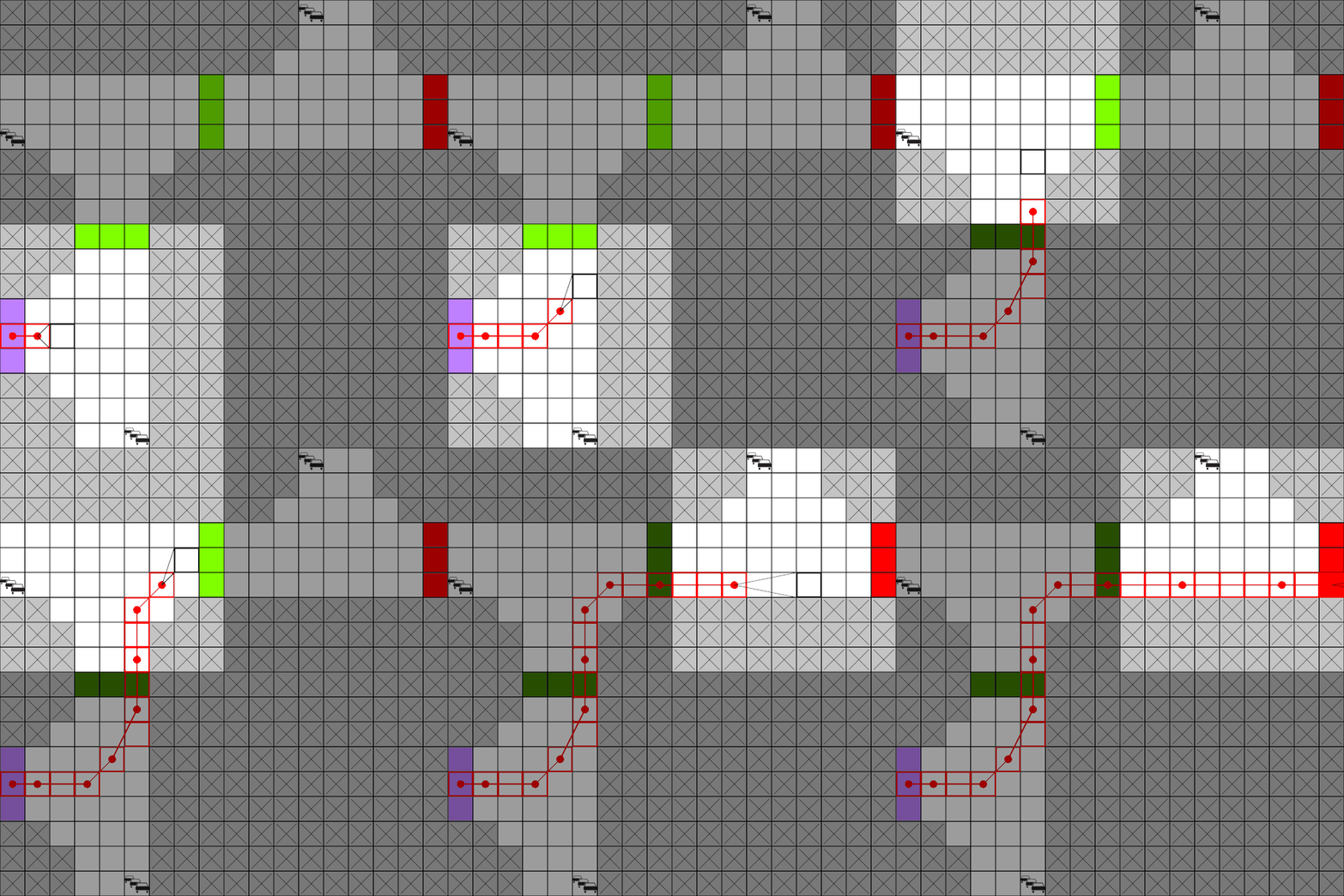
The single tile (9×9 by default) the agent is currently inside is observed.
- Sliding observation window
A window of configurable size stays centered on the agent. Enable it by passing awindow_sizeto theObservationContextwhich then automatically enables the sliding window mode.
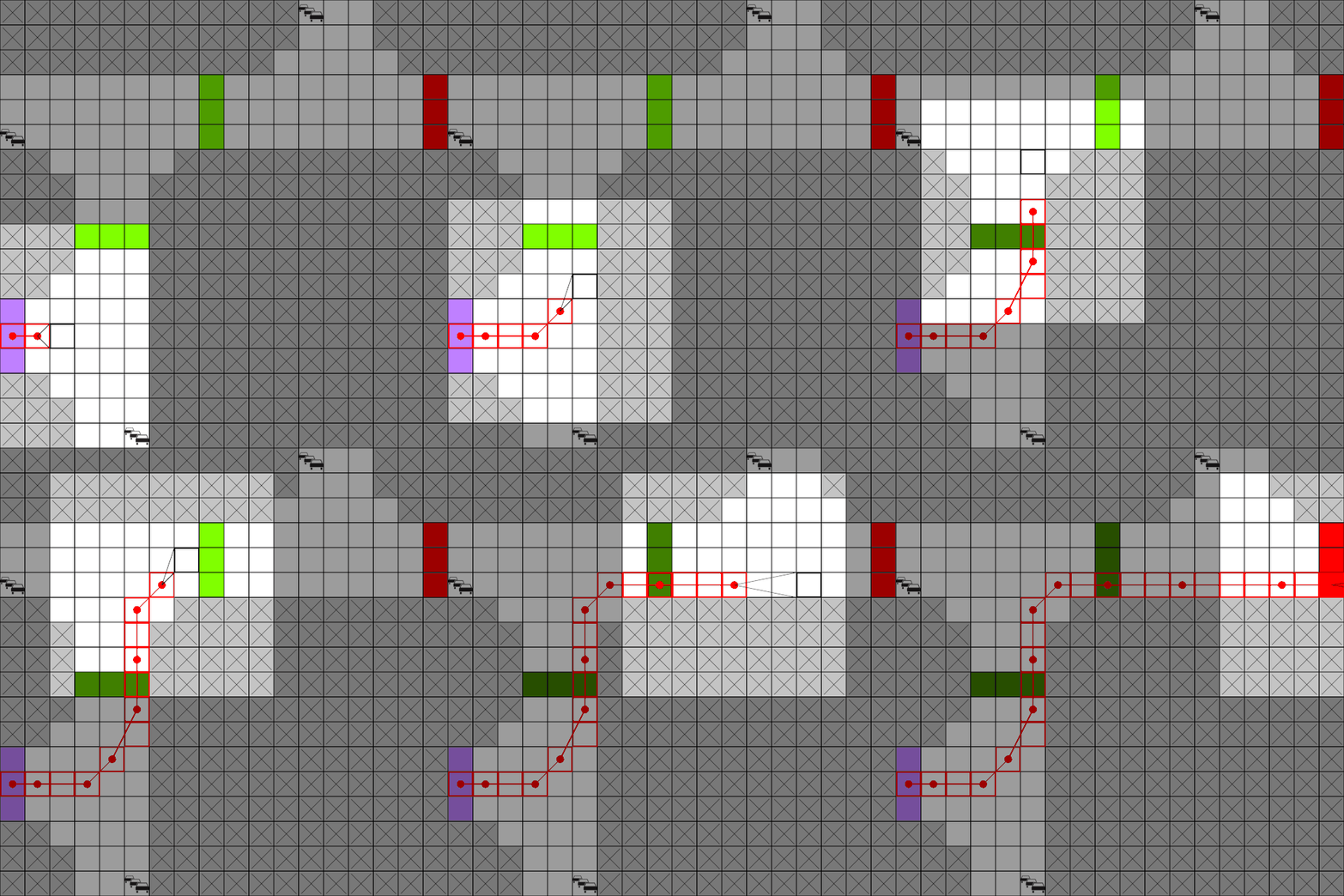
In both animations, the highlighted area is the observable region.
Flattening
Many libraries cannot directly consume Dict observations. Wrap the environment in a
FlattenObservation wrapper to use it:
Reward
Reward is assembled from a set of components, all of which are configurable via the reward configuration:
| Component | Default | When it applies |
|---|---|---|
| Subgoal / goal reward | +1 per (sub)goal |
The first time each subgoal or the final goal is reached this episode. |
| Final-goal bonus | +0 |
Added on top when the final goal is reached. |
| Crash penalty | −1 |
Moving into a wall or traffic (also ends the episode). |
| Traffic-light penalty | −0.5 |
Running a red light (does not end the episode). |
| Standing-still penalty | 0 |
Applied each step the agent does not move. |
| Already-visited penalty | 0 |
Moving onto a cell already visited this episode. |
Splitting the subgoal reward
With split_subgoal_reward=True the subgoal reward is divided by the number of subgoals,
so the total reward for completing a track is constant regardless of how many subgoals it has.
However, this could make value learning harder, as the number of subgoals can differ between episodes
without the agent being aware of it.
Separating reward and cost
For safe RL experiments, set separate_reward_cost=True.
Penalties are then not subtracted from the reward; instead they are reported as a separate cost signal in info["cost"],
while reward carries only the (positive) task reward.
Termination
An episode terminates (terminated=True) when the agent reaches the final goal or crashes.
info["termination_reason"] reports why, as one of:
termination_reason |
Meaning |
|---|---|
"goal reached" |
The final goal was reached (success). |
"wall collision" |
The agent drove into a wall. |
"traffic collision" |
The agent collided with a traffic car. |
"out of bounds" |
The agent left the map. |
None |
The episode is still running. |
PGTG does not truncate by itself, i.e., truncated is always False.
Use a TimeLimit wrapper for a step budget.
The info dictionary
reset() and step() return a rich info dict. Commonly useful keys:
| Key | Description |
|---|---|
x, y |
Global agent position. |
x_velocity, y_velocity |
Agent velocity components. |
flat_tire |
Whether the agent currently has a flat tire. |
termination_reason |
See the table above. |
subgoals_reached |
Number of subgoals reached this episode. |
subgoal_completion_rate |
Fraction of subgoals reached. |
is_success |
(step only) Whether the final goal was reached. |
cost |
(step only) Total penalty this step (see separate reward/cost). |
current_tile_type |
The exit configuration of the tile the agent is on. |
cars |
The current traffic cars (id, position, route, driver profile). |
driver_profile_stats |
Counts/percentages of driver profiles among the traffic. |
traffic_rules |
Active/triggered traffic rules and the inferred agent direction. |
visited_set |
All cells visited this episode. |
rng_states |
Serialized RNG state (used to restore an exact state). |
How many of these keys the info dict contains is controlled by the env's info_level:
the default "essential" only includes the cheap scalar entries (position, velocity,
flat tire, tile type, termination reason, subgoal progress), while "restorable"
adds the full mutable episode state (cars, RNG and obstacle-RNG states, visited set,
active subgoals, and the traffic-light phase). A "restorable" info dict
can be passed to env.set_to_state(info) to restore an environment built on the
same map to exactly this point. To obtain a different future, strip the
rng states from the info dict before passing it to set_to_state().
info_level="none" (or None) makes get_info() return an empty dict. step() still adds cost and is_success.
Render modes
Choose the render mode at construction with render_mode:
render_mode |
render() returns |
Behavior |
|---|---|---|
None (default) |
None |
No rendering. |
"human" |
None |
Draws into a pygame window (opened on the first frame). |
"rgb_array" |
np.ndarray (H, W, 3) |
An RGB image array (uint8). |
"pil_image" |
PIL.Image.Image |
A PIL image. Convenient for inline display in notebooks. |
In "human" mode reset() and step() call render() themselves, so the window keeps
up with the episode; calling env.render() directly redraws the current frame.
Call env.close() when you are done to shut the window down.
The human-mode frame rate is metadata["render_fps"] (default 4).
only_render_obs=True renders the agent's observation instead of the entire map:
the view is cropped to the observation window and only the features listed in
observation_context["obs_features"] are drawn. Anything the agent cannot observe stays hidden.
Seeding and reproducibility
PGTG derives all randomness (map generation, traffic, and each obstacle) from a single
master seed using NumPy's
SeedSequence:
- Passing
seed=to the constructor sets the master entropy source. - Each
reset()spawns a fresh batch of child streams from the master sequence. Callingreset()repeatedly without a new seed therefore produces a reproducible sequence of episodes. - Passing
seed=toreset()starts a new sequence with the given seed.
This holds for user-provided custom obstacles too: their independent generators are restored from the same per-episode sequence, so custom obstacles are reproducible by default.